Registered Nurse SVG PNG Bundle: Embroidery Design Review
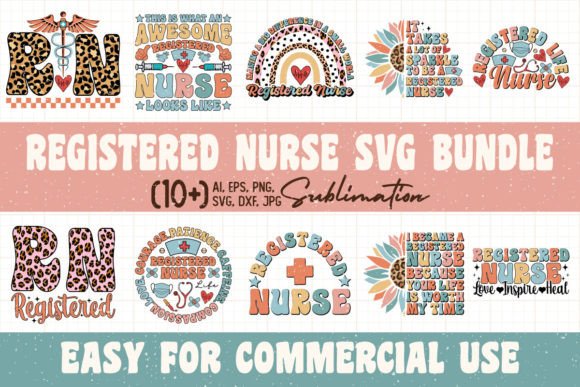
As an embroidery designer who regularly tests digital assets before they ever touch a hoop, I approached the Registered Nurse SVG PNG Bundle with a practical checklist. My goal was simple: could this graphics pack actually help me create a finished product that looks intentional, clean, and sellable? The bundle comes with 17 high‑resolution PNG files at 300 dpi, each sized at 6000×6000 pixels with a transparent background. Right away, that generous canvas gives me room to think.
First Impressions and Design Personality
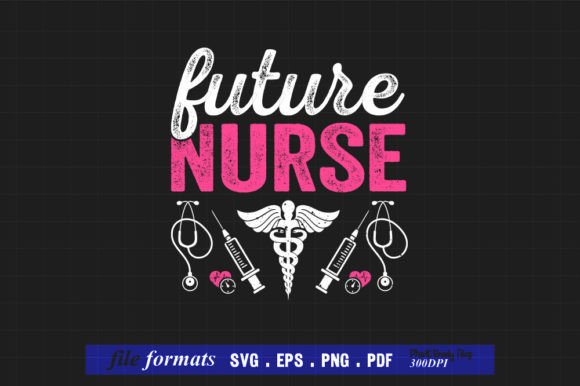
Opening the folder, the mood is warm, professional, and unmistakably nursing‑themed. The graphics lean into recognizable symbols of care—heartbeat lines, stethoscopes, caduceus icons, and RN monogram styles—without feeling overly clinical. A few pieces feel soft enough for a baby onesie, while others carry a bolder, badge‑like energy that would sit perfectly on a structured tote bag. The transparent backgrounds mean I can layer these elements over different fabric colors in my digitizing software without wrestling with white boxes. That alone saves me a solid ten minutes per design mockup.
The sheer size of the files matters. At 6000 pixels square, I can scale down to a 4‑inch patch or enlarge a statement graphic for the back of a sweatshirt, and I’m not chasing pixelation. But I’m not looking at these as final stitch files—I’m seeing them as design assets that need to be translated into embroidery language. The visual personality is consistent across the 17 pieces, which makes it easy to build a small collection of products that feel like a cohesive set rather than a random assortment.
Real‑World Embroidery Application: Nurse Appreciation Tote Bag
Let me walk you through a real scenario. I’m preparing a custom tote bag for a retiring nurse—something she’ll actually use, not just hang on a wall. I pull a graphic from the Registered Nurse SVG PNG Bundle that combines a stethoscope and a handwritten‑style “RN” inside a simple heart frame. The first thing I do is import the PNG into my digitizing software. Because the file is huge and sharp, the auto‑trace picks up the outline cleanly, and I can refine the nodes manually in about fifteen minutes.
For the tote, I’m working on a natural canvas fabric. I choose a medium‑weight cutaway stabilizer to keep the design from sinking into the weave. The stethoscope curves need a sleek satin stitch, but I reduce the stitch length slightly to avoid puckering on the textured surface. The tiny “RN” lettering inside the heart—maybe a quarter‑inch tall in the final stitch‑out—is the first red flag. I test it on scrap fabric and see that the counters in the “R” are closing up. I decide to enlarge the lettering by 20% and switch to a clean running stitch for the inner details. The design still looks balanced, and now it reads perfectly at arm’s length.
Thread color choice is where the bundle’s transparent PNGs really help. I pull up the design on a dark navy fabric mockup and a cream fabric mockup. On the dark background, a white and gold thread combination gives the stethoscope a crisp, classic feel. On the cream, I go with a deep teal and a soft coral accent—nodding to the heart shape without screaming “medical.” I can already picture a customer’s reaction: “This looks like it was made just for me.”
Where the Design Shines in Handmade Products
After my test stitch‑out, I’m confident this bundle can slide into a wide range of craft projects. The aesthetic is clear enough for the following:
- Custom sweatshirts – a single large graphic on the front or back reads as a thoughtful gift during Nurses Week.
- Tote bags – durable canvas and a centered design produce a boutique‑worthy shopping bag.
- Pillow covers – a soft, tonal design in the corner turns a plain throw pillow into a personalized keepsake.
- Patches – a few of the badge‑style graphics stitch out beautifully on twill fabric with a merrow border.
- Kitchen towels – a smaller, simplified graphic on a flour‑sack towel adds a charming touch without overwhelming the weave.
- Nursery decor – the softer heart and script motifs work well on a baby blanket or a onesie, especially in pastel threads.
Because the bundle includes 17 variations, I can offer a “nurse collection” in my Etsy shop rather than a single listing. A customer might buy a tote bag and a matching patch, or a sweatshirt and a pillow cover. The consistent visual language builds trust and makes the shop feel intentional.
Careful Considerations for Stitching Success
Not every fabric or hoop size will handle these graphics equally. The Registered Nurse SVG PNG Bundle is generous with detail, but embroidery demands editing. Here’s where I’d apply extra caution:
- Small hoop sizes – anything under 4×4 inches can make the detailed elements, like a heartbeat line overlapping a caduceus, turn into a blob. I’d simplify the design or isolate just one central symbol.
- Stretchy fabrics – a jersey knit sweatshirt needs a fusible mesh stabilizer and maybe a topper to keep the stitches from tunneling. I’d also avoid designs with long, thin satin columns that can shift during wear.
- Dark fabrics – the transparent PNGs let me preview the design against a black background, but I still need to punch up the thread contrast in reality. A navy blue thread on a black tote disappears, so I’ll stick with bright white, gold, or a vibrant teal.
- Curved surfaces – caps and hats are a challenge. The 6000×6000 pixel canvas is great, but if I’m placing a design on a curved cap, I have to account for distortion. I’d test the file on a scrap cap panel first and likely reduce the width by 10% to keep the graphic from looking stretched.
- Frequent washing – items like tea towels or baby onesies will see a lot of laundry. I’d add a light underlay stitch to lock everything down, and I’d use polyester thread for colorfastness.
I also spent time looking at the design in black and white mockups. If a design loses its legibility without color, I know it will struggle in a single‑color thread scenario. Several of the graphics held up well, but the ones with fine overlapping lines needed a little manual separation in my digitizing software to keep the stitch paths distinct.
How the Bundle Elevates a Craft Business
Beyond the technical stitching, the Registered Nurse SVG PNG Bundle adds real value to a handmade shop. The high resolution makes it a strong asset for printable mockups. I can drop a PNG onto a digital tote bag template for my Etsy listing, and the 300 dpi file looks crisp even when I zoom in. That matters for buyer confidence—when a customer clicks on a listing, the quality of the preview image directly influences their trust.
From a branding perspective, the bundle’s nursing theme is specific enough to attract a niche audience but broad enough to work for different occasions: graduation, retirement, appreciation, or just a “thinking of you” gift. I’ve used similar graphics to create a small line of “Nurse Life” apparel, and the repeatable style keeps the product photography cohesive. The 17 files give me enough variety to rotate designs seasonally without feeling stale.
One important note: the product title mentions SVG, but the included files are listed as 17 PNGs. If you require scalable vector files for cutting machines or very specific digitizing workflows, it’s worth confirming with the seller before purchase. For my embroidery work, I’m entirely comfortable using high‑resolution PNGs as a base, but I’d never assume an SVG is in the folder unless the description explicitly states it. Always check exactly what’s in the download.
Practical Designer Notes Before You Start
I keep a small checklist whenever I prep a new digital asset for embroidery. If you’re planning to use the Registered Nurse SVG PNG Bundle in your next project, here’s what I’d recommend:
- Test on scrap fabric first – even if the auto‑digitize looks clean, one test stitch reveals puckering, thread breaks, and density issues.
- Check thread color contrast – hold real thread spools against the fabric, not just the screen.
- Review stitch density – reduce density for lightweight fabrics, increase for stable ones.
- Confirm hoop size – measure the final stitch area, not the PNG canvas size.
- Inspect small details – if a detail like a tiny cross or a serif disappears, simplify it.
- Test in black and white mockups – this helps you see the design’s bones.
- Compare light and dark fabric backgrounds – the graphic that looks great on cream might vanish on charcoal.
- Use proper stabilizer – cutaway for knits, tear‑away for woven, spray adhesive for tricky placements.
- Check licensing – confirm whether the bundle allows commercial use on finished products. If the terms aren’t clear, reach out to the seller. This is essential for your craft business.
Final Thoughts on the Registered Nurse SVG PNG Bundle
After a week of testing, I keep coming back to the versatility tucked inside this Registered Nurse SVG PNG Bundle. It’s not a stitch‑ready embroidery file, but it’s a rare kind of graphics pack that gives you enough detail to work with and enough room to make each design your own. The transparent backgrounds and enormous pixel dimensions mean you can plan a full range of products—from a delicate baby embroidery to a bold sweatshirt statement—without ever feeling limited by the asset itself.
For embroidery designers, small business owners, and crafters who are comfortable with the digitizing step, this bundle earns its keep. It turns a generic nursing theme into something that feels personal and presentation‑ready. Just remember to test, simplify where needed, and always let the fabric be your final guide. The finished stitch‑out will tell you more than any screen preview ever could.